
The concepts behind the use cases, in the order they build.
Run your system
You built it. Now see it all working together.
You started with a workspace. Now you have a system that remembers your context, repeats work, coordinates agents, and can keep working when you’re away.
In this final session, you’ll put the whole system to work, see what it can already do for you, and decide what you want to build next.
- See everything you’ve built, run one workflow end to end, and identify what you’ll build next.
- You’re no longer starting from scratch each time you open AI. You’ve built a system that knows your context, can repeat work, and can take on jobs for you.
- A working agentic system you built yourself, plus a clear next step for making it more useful.
- 30 to 45 minutes. If you show your workflow to someone else, allow a little extra time for their questions.
- Claude Desktop or Cursor connected to your project, with the BlueRock toolkit installed and
/bluerock:checkpassing. Everything else you need, you already built.
See what you built
Over the past seven sessions, you didn’t just complete a series of exercises. You built four parts that now work together as one agentic system.
- 1MemoryYour context: who you are, how you write, and what matters right now.
- 2SkillsRepeatable jobs you run by name.
- 3Agents & TeamsSpecialists you hand a whole job to, alone or working together.
- 4RoutinesWork that runs on a schedule, without you.
Each part made the next one more powerful. Your skills use your context. Your agents use your skills. Your routines put that work in motion without you having to start it every time.
You started by giving AI individual jobs. Now you have a system that remembers, repeats, delegates, and runs.
Next, you’ll see what your system looks like and put it to work.
What you’ll do in Claude Code
Claude Code will guide you through reviewing the system you built. You’ll see what’s in your project, describe what it now does for you, run one workflow end to end, and decide what to build next.
- 1
Start the session.
Paste this into Claude Code:
teach me Session 8
You’ll see: Claude Code reads your project and shows you what you’ve built: your memory, skills, agents, routines, and the files behind them. You can also type
/bluerock:learnto pick up wherever you left off. - 2
See what’s yours.
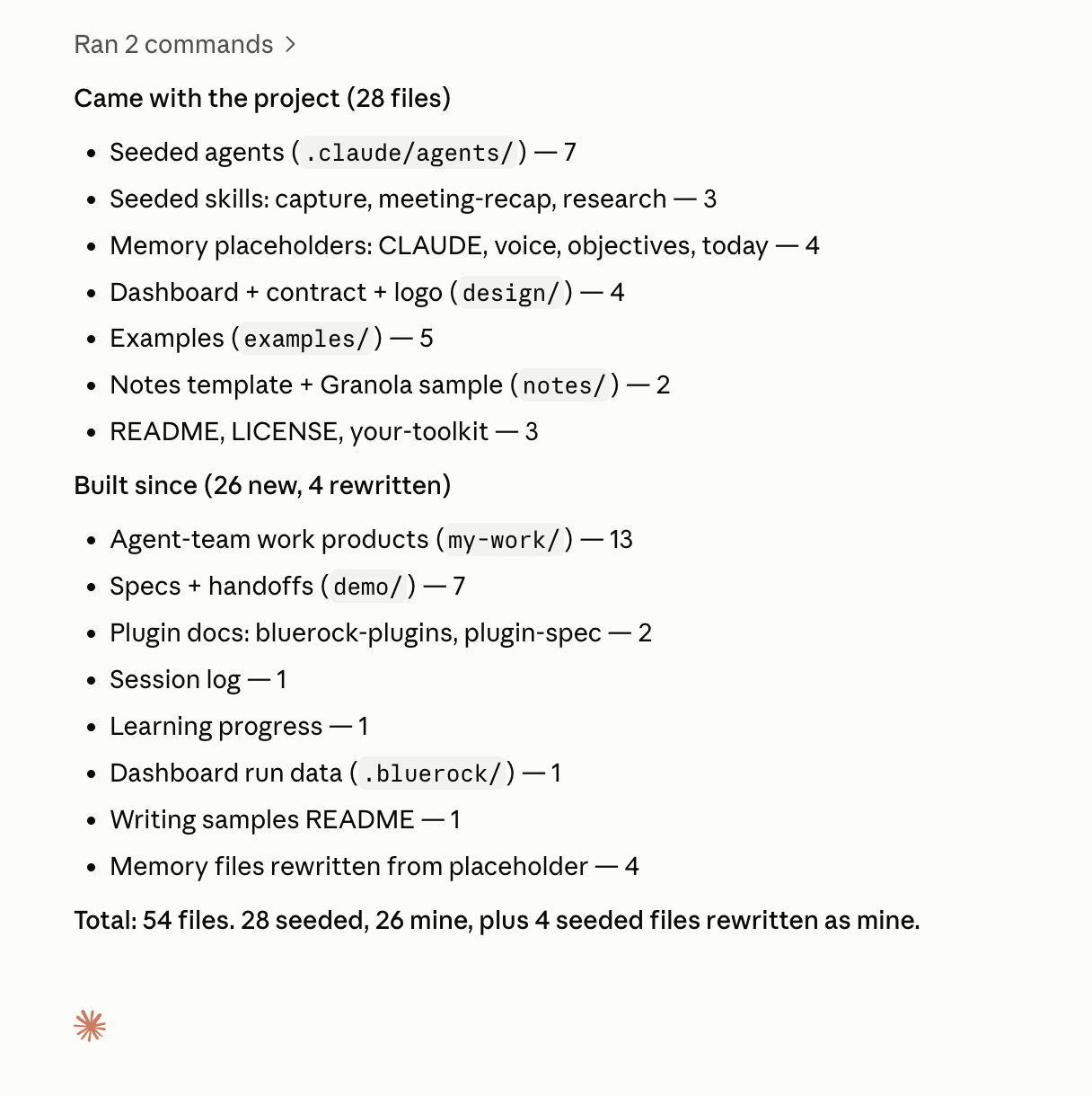
Look at what came with your project and what you added over the past seven sessions.
You’ll see:
meeting-recap,capture, andresearchnamed as skills that came with your project, andscribe,daily-brew,researcher,signal-scanner,composer, andmeeting-prepas the agents that did. Everything named outside those two lists is yours. - 3
Describe what your system does.
Say it in three sentences: what runs, what it produces, and what you no longer have to do by hand.
You’ll see: a concrete description of what you built. “It saves me time” is too broad. “I no longer rebuild my weekly recap from scratch” is something you can see and measure.
- 4
Run it end to end.
Choose one real workflow and run it: dispatch an agent, run a skill, or click Run now on a routine.
You’ll see: your system doing real work using the pieces you built. Follow it through to the output and open the finished file.
- 5
Name your next build.
Choose one thing that would make your system more useful and describe it in a sentence.
You’ll see: a next step specific enough to build. “Improve my system” is too broad. “Check whether the follow-up already went out before creating another” is ready to build.
- 6
Save your checkpoint.
When you’re finished, type
/bluerock:wrap-up. Review what Claude Code is about to save, then approve it.You’ll see: a summary of what you accomplished, your updated project dashboard, and a continuation prompt that lets your next chat pick up where this one ended.
Eight sessions in, you’re not leaving with an exercise. You’re leaving with a working system you built around your own work.
Recap
You started this course with an AI tool. You’re finishing it with a system you built yourself.
What you built
- Memory — context that helps your system understand you and your work.
- Skills — repeatable jobs your system knows how to do.
- Agents & Teams — specialists that can take on larger jobs for you, alone or working together.
- Routines — work that can run on a schedule without waiting for you.
What changed
You no longer have to start from scratch every time you work with AI.
Your system can remember context, reuse what you’ve taught it, take on larger jobs, and keep work moving.
You can build with AI.
In eight sessions, you went from using AI one conversation at a time to building an agentic system around your own work.
You built it. You ran it. And now you know how to keep making it better.
You’re not done building. You now know how to build.
Practice
You built the system. Now decide where it goes next.
Write four things you want to be true 30 days from now:
- One new skill your system can run.
- One agent that handles more of a job for you.
- One routine that runs reliably without you.
- One thing you no longer do by hand.
Keep each one specific enough that you’ll know whether it happened.
Thirty days from now, these four lines should show how much further your system has come.
And keep one habit from this course: close every working chat with /bluerock:wrap-up.
That way, every session leaves your system a little better than you found it.
What’s next
Build the next thing
Every session is behind you. Every use case is a team, a skill, or a schedule you now understand; pick one and put it to work.
- News Monitoring & ResponseTurn important industry news into a timely, informed response that reflects your company’s point of view.
- Battlecard RefreshKeep your competitive battlecards current — and see exactly what changed since the last time you looked.
- CRM Cleanup & EnrichmentClean up incomplete account data, fill in what’s missing and get a better CRM file back — without touching your CRM.
- Brand Messaging DocWrite your positioning, voice, and proof points down once, in your own words, and see where your website drifts from them.
- Account ScorecardTurn a company name into a scored account brief based on the criteria that matter to your team.
- Competitor BattlecardsTurn competitor research into a sourced card per competitor your team can take into a deal.
- Account Signal DigestTurn account activity into a prioritized view of what changed and what deserves attention.
- Answer Engine VisibilitySee how AI answer engines describe your company, where you’re missing and what to improve.
- Sales Outreach PrepTurn a prospect list into a researched outreach kit: who they are, why now, and what to say.
- Process to SkillTurn a process only you know how to run into a skill you can save, improve and run again.
The learning path
Every session, as reference depth: come back to any one when you want the why behind a build.
The learning pathYou have a system worth showing.
Post what you built, see what others are running, and tell us what to cover next.
Learn more
Want to understand a little more about what just happened? Open these for a quick look behind the scenes.
How do the four parts work together?
Think of them as layers:
Memory gives your system context.
Skills turn repeatable work into reusable instructions.
Agents and teams use that context and those skills to handle larger jobs.
Routines trigger work automatically.
Together, they turn individual AI interactions into a system that can remember, act, and keep work moving.
Does my system keep learning on its own?
Not automatically.
Your system uses the memory, skills, agents, teams, and routines you give it. As your work changes, you can update those pieces so the system gets more useful over time.
The important difference is that you don’t have to rebuild from scratch. You improve what you already have.
What happens when a routine runs while I’m away?
The routine starts at the time you scheduled and follows the instructions you gave it.
When you return, review what happened. Check the output, look for anything unexpected, and adjust the routine if needed.
Start with work that is easy to review before automating higher-impact actions.
How do I decide what to build next?
Look for friction in your real work.
Repeating yourself? Add memory.
Doing the same task repeatedly? Build a skill.
Handing off a larger job? Create an agent.
Doing something on a predictable schedule? Create a routine.
You don’t need to design the perfect system. Build around the work you actually do, one useful piece at a time.
Want to show it to someone?
This is a good session to show what you built.
Walk someone through your system, live or on a recording, and run one workflow for them. Don’t worry about explaining every piece. Show them what it does. Their questions can help you see what’s working and what you might build next.
This is optional. If you’d rather not, Claude Code will walk through the same questions with you.
The AI and building terms these sessions use are collected in the glossary.