
The concepts behind the use cases, in the order they build.
Put your first AI team to work
Your setup is done. Now let’s put it to work: you’ll give an AI team a real job and get finished work back.
- Give one job to a small team of AI agents and watch them work together.
- A bigger job becomes easier to manage when different agents handle different parts of it.
- A finished one-page messaging doc or account scorecard, saved in your project.
- About 5 minutes. About 15 if your work is marketing: that path asks a few short questions about your brand first.
- Claude Desktop or Cursor connected to your project, with the BlueRock toolkit installed and
/bluerock:checkpassing.
One team, one job, one result
You’re about to give an AI team a real job. One agent gathers the information, another turns it into useful work, and you get back a finished result.
The same kind of team takes on different kinds of work. Here are two examples:
| Step | Marketing example | Sales & ops example |
|---|---|---|
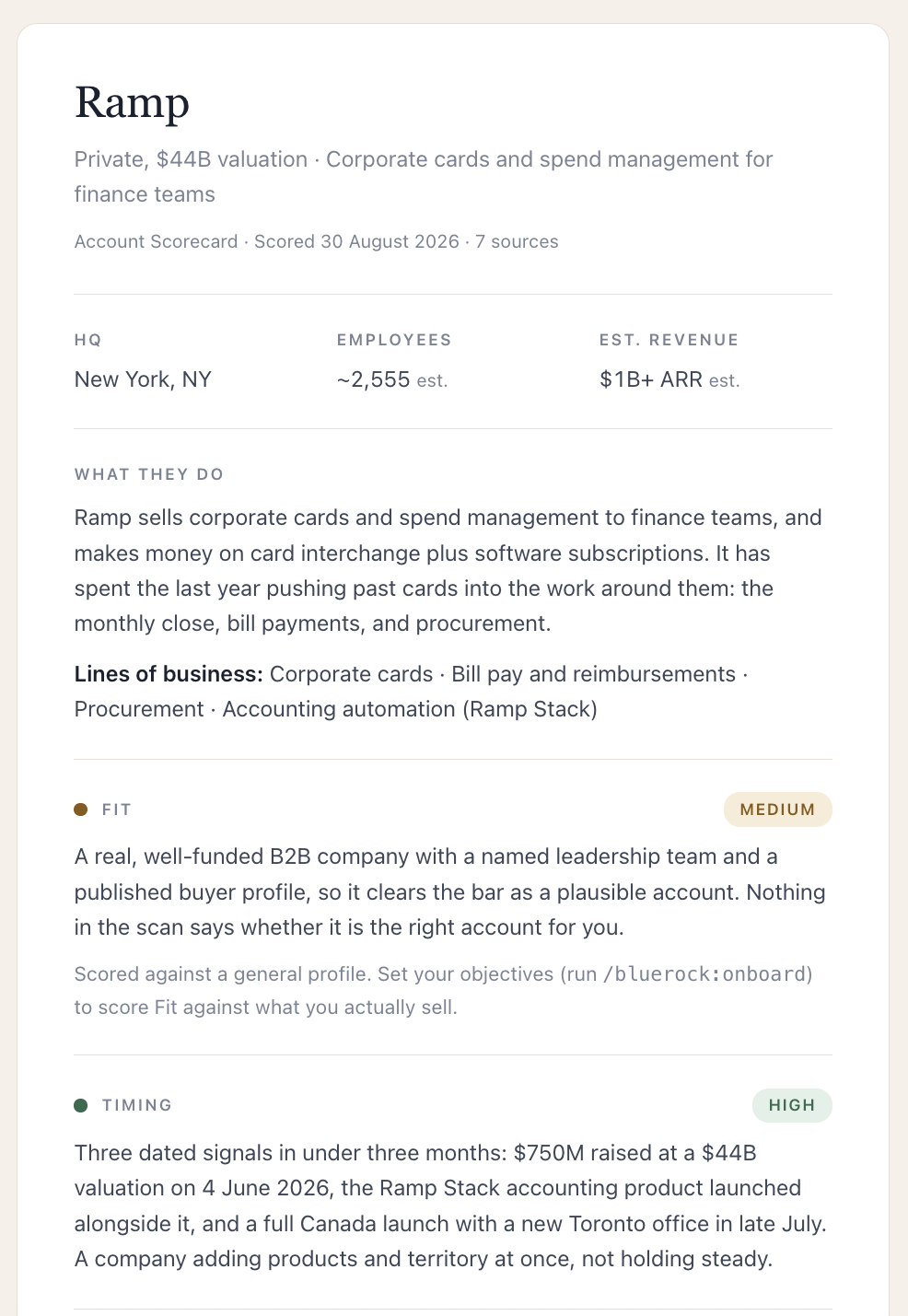
| You ask | “build my messaging doc for acme.com” | “score Ramp” |
| Agent 1 | reads your site and captures what it actually says | researches the company and what’s changed |
| Agent 2 | turns that into positioning, voice, and key phrases | assesses it and recommends a next step |
| You get | a one-page messaging doc | a one-page scorecard |
Next, you’ll put the team to work on your own target.
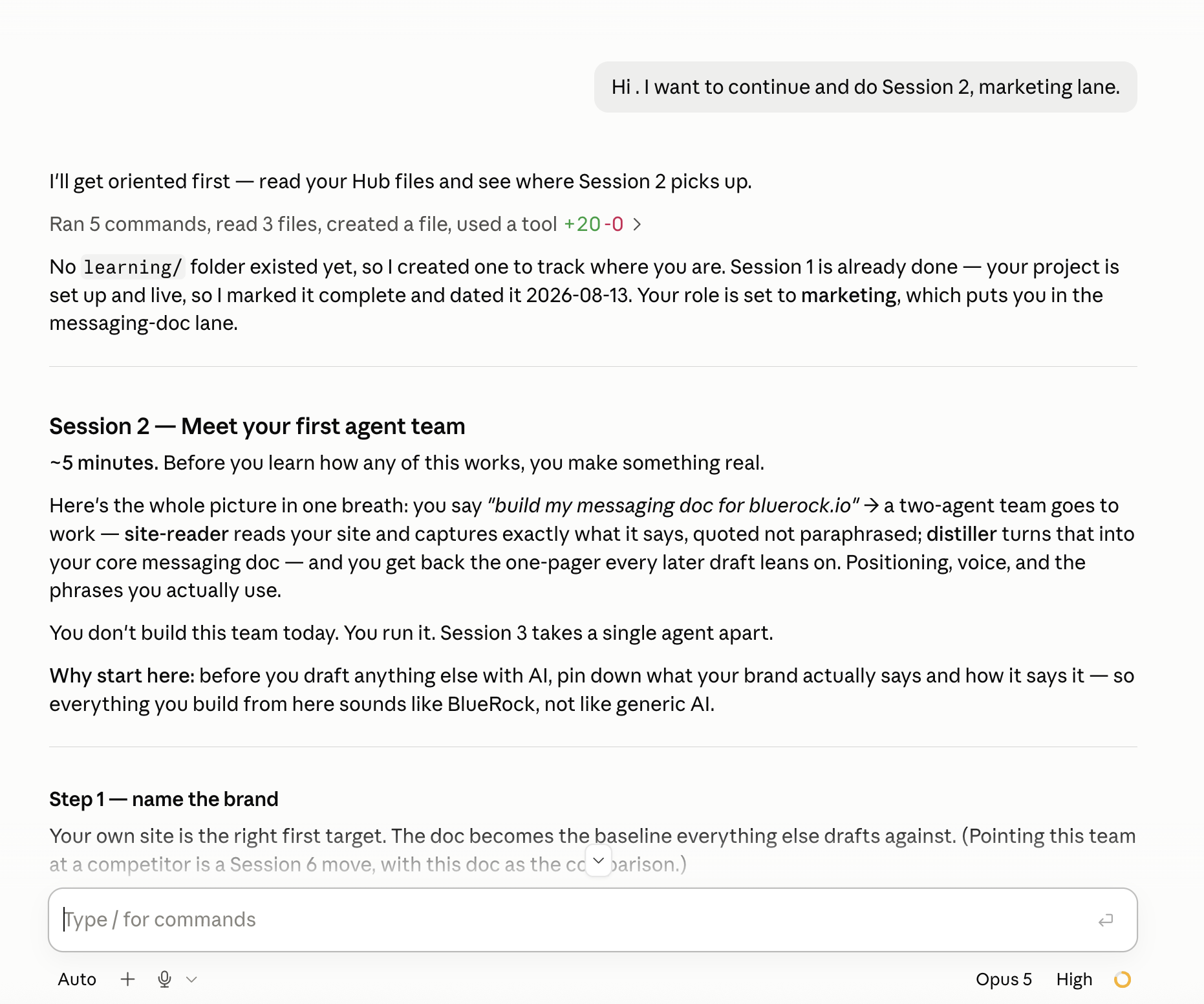
What you’ll do in Claude Code
We recommend doing the hands-on work in Claude Code, where you’ll be guided step by step. Prefer to follow along here? Use the instructions below.
- 1
Paste the line below into Claude Code.
teach me Session 2
You’ll see: Claude Code loads Session 2. The first time, it asks whether your work is closest to sales, marketing, or operations, then what to point the team at. (You can also type
/bluerock:learn— it picks up wherever you left off.) - 2
When it asks, name the company or website you want the team working on.
In marketing, it then asks a few short questions about your brand. Answer them: your answers are what the messaging doc is written from. Skip them and you get a shorter read of what your site says today.
- 3
Wait while the two specialists run. The first agent gathers info, the second agent assesses it to create the report.
You’ll see: the first specialist runs, then hands its work to the second.
- 4
Read the finished document and check what it got right.
You’ll see: it opens as a Claude Artifact and saves to
my-work/, the folder in your project where everything you and your agents finish is kept, with its sources. - 5
Type
/bluerock:wrap-upto close out the chat.You’ll see: the run logged to your dashboard.
Recap
You just put your first AI team to work. You gave the team a job: one agent gathered the information, another turned that work into a finished result. That’s the idea behind an AI agent team — instead of asking one AI to do everything, you divide the work among agents with different jobs, working toward the same outcome.
You can direct AI work, not just ask AI questions. You gave a team a job, let the agents handle different parts of it, and got useful work back — and you didn’t have to build the agents yourself to put them to work.
Practice
Run it once more, on something where the answer matters to somebody besides you. Notice one thing you wish the team had done differently — in the next session you’ll open one of these agents up and change exactly that.
- Run it again on a second real target.
- Compare what it recommended with your own judgment.
- Write down one thing you’d change about how it works. Session 3 is where you change it.
What’s next
Anatomy of an agent
You've used an AI team. Next, you'll look inside one of the agents and change how it works.
Start Session 3Ran a use case already?
Then you have met a team like this one. Every use case is a small team with one job; pick the next one, or go back to the one you ran and make it yours.
Pick a use casePost what your agent team created.
Other builders are running the same team on different companies. Their results will show you what to try next.
Learn more
Want to understand a little more about what just happened? Open these for a quick look behind the scenes.
Why use a team instead of one long prompt?
Different agents can focus on different parts of a job. In this exercise, one agent focused on gathering the right information; another focused on turning that information into a useful result. Each had a clear role, but they worked toward the same outcome. Breaking up the work this way can make more complex jobs easier to manage, repeat, and improve.
Where did my finished work go — and who can see it?
The work your team created is saved with your project, so it doesn’t disappear when the chat ends. The polished view that opened beside the conversation is a Claude Artifact; the file in your project is what later sessions build on, and the run is logged to your dashboard. That means you can come back to it, build on it, or use it as part of future work.
The artifact itself is private to your account until you share it— and sharing the link shares everything on the page, not just the part you were proud of. Worth a beat before sending a scorecard onward: it names an account and your read on it. The full picture is in the Claude Artifacts guide.
Should I keep one chat going, or start a new one?
Start a new one for each task. Do the work, then close out with /bluerock:wrap-up. Each wrap-up logs what you did, so after a week your dashboard shows what you and your agents actually built.
What are agents, skills, and subagents?
You’ll see these terms as you work more with AI. An agent is an AI worker given a specific job, instructions, and the tools it needs to do that job. A skill is a reusable set of instructions that helps an agent perform a particular kind of work. A subagent is a specialized agent that handles one part of a larger job on behalf of another agent or team. You don’t need to master these terms yet — for now, the important idea is simple: different agents can take on different parts of a job and work together to produce a result.
The AI and building terms these sessions use are collected in the glossary.