
Battlecard Refresh
Keep your competitive battlecards current — and see exactly what changed since the last time you looked.
Intermediate · Marketing · Sales
Updated competitive battlecards
Refreshed battlecards that show what changed across your competitors, so your team can focus on what’s new instead of rereading what it already knows.
First result in about 15 minutes · Saves ~2 hours per refresh (est.)
Marketing · Sales · No integrations required
You’ll need your existing Competitor Battlecards in BlueRock. Nothing new to upload or set up.
Free for 30 days, then $10/month.
What happens after you sign up
You’ll need a paid Claude plan (the free plan does not include Claude Code) and Claude Desktop or Cursor on your computer.
Create your account
The console opens in a new tab. Confirm your email and your workspace is ready.
Connect your AI tool
Get started takes about 10 minutes, and this tab opens it when you sign up.
Build Battlecard Refresh
First result in about 15 minutes, from the command at the end of Get started.
Stuck at any step? Ask in the BlueRock Builders Slack, where builders and the BlueRock team answer.
Your battlecard was current when you made it.
Then the competitor changed its pricing. Shipped a new feature. Repositioned the product. Rewrote its homepage.
Competitive research gets stale quickly. The problem isn’t building the first battlecard — it’s keeping it current without researching every competitor again from scratch.
BlueRock checks the competitors you already track, finds what changed and updates your battlecards so your team knows what’s different and what matters now.
Your Battlecard Refresh
See what changed without rereading the entire competitive landscape.
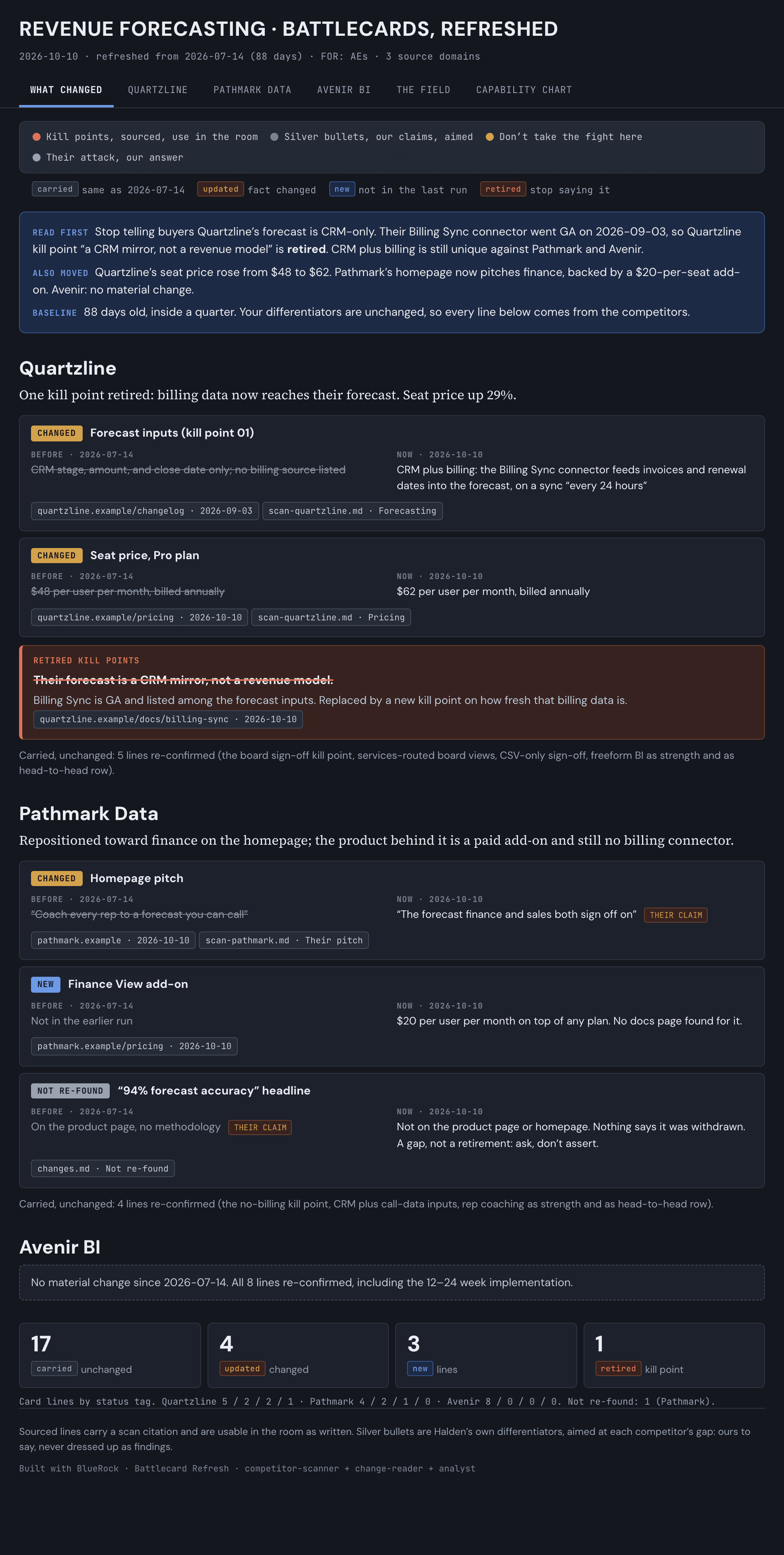
Your refresh shows:
- What changed — The most important updates since your previous battlecard, surfaced first.
- Positioning changes — New messaging, claims or shifts in how the competitor presents itself.
- Product updates — New capabilities, launches or meaningful changes to the offering.
- Pricing changes — Updates to published pricing, packaging or plans when available.
- Updated battlecards — Your existing cards refreshed with the latest competitive information.
- Source evidence — The sources behind new competitor information so your team can see where it came from.
Your previous versions stay available, giving you a record of how each competitor has changed over time.
How you’ll build it.
Start with the battlecards you’ve already created. BlueRock goes back to the same competitors and looks for what has changed.
Start from your existing battlecards
BlueRock picks up the competitors, research and context already in your workspace.
Check what changed
Research each competitor again for changes in positioning, product, pricing and other meaningful developments.
Separate new from old
Compare the latest research with your existing battlecards and identify what has actually changed.
Refresh your battlecards
Update the cards with the latest information and put the changes up front so your team can quickly see what’s new.
Keep them current.
This use case is designed to be rerun.
Run it weekly — or whenever something changes in your market — to check the same competitors again. Each refresh starts from what you already know and adds what changed.
Earlier versions stay in your workspace, so you can see how competitors have moved over time instead of rebuilding the research every time.
Your project lives in your workspace. Back it up to GitHub once, and every build after this one is saved with it.
Why BlueRock?
- Your work and context stay with you
- BlueRock saves the instructions, inputs and decisions behind what you build — not just the final output.
- Build once. Keep improving.
- Run the workflow again, update it with new information and build on what you have already created.
- See and control the work
- Understand what your agents ran, what tools they used and what the work cost, with controls over what they can access and do.
- For this use case
- Keep the same competitors current and see what changed without rebuilding your battlecards.
Refresh your Battlecards.
Find what changed across your competitors and give your team current battlecards without starting the research over.
Already building? Run this in your workspace: /bluerock:battlecard-refresh
You’ll need a paid Claude plan and Claude Desktop or Cursor. After you sign up, Get started connects your AI tool in about 10 minutes.
Free for 30 days, then $10/month.