
CRM Cleanup & Enrichment
Clean up incomplete account data, fill in what’s missing and get a better CRM file back — without touching your CRM.
Intermediate · Operations · Sales
A cleaned and enriched account list
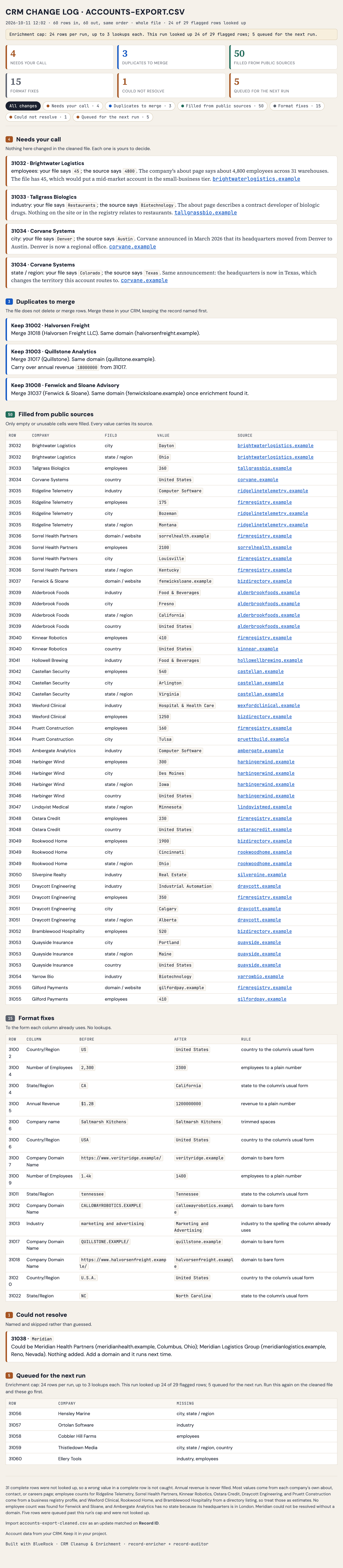
A ready-to-import account file with missing information filled in, potential problems flagged and a record of every change.
First result in about 15 minutes · Saves ~2 hours per cleanup (est.)
Operations · Sales · No integrations required
You’ll need an export of your CRM account data as a spreadsheet file.
Free for 30 days, then $10/month.
What happens after you sign up
You’ll need a paid Claude plan (the free plan does not include Claude Code) and Claude Desktop or Cursor on your computer.
Create your account
The console opens in a new tab. Confirm your email and your workspace is ready.
Connect your AI tool
Get started takes about 10 minutes, and this tab opens it when you sign up.
Build CRM Cleanup & Enrichment
First result in about 15 minutes, from the command at the end of Get started.
Stuck at any step? Ask in the BlueRock Builders Slack, where builders and the BlueRock team answer.
Your CRM has the accounts. That doesn’t mean the data is good.
An account with no industry. Two records that look like the same company. A headquarters that moved two years ago.
Finding those problems is one thing. Researching companies one at a time to fix missing or outdated information is where the work piles up.
BlueRock reviews your account export, finds what needs attention and researches the gaps — giving you cleaner, more complete data to review and import back into your CRM.
Your Cleaned Account List
See what needs fixing, what BlueRock added and where the new information came from.
Your cleanup shows:
- Missing data — Important account fields that are empty or incomplete.
- Likely duplicates — Records that may represent the same company, flagged for you to review.
- Inconsistent data — Formatting and account information that may need to be standardized.
- Enriched accounts — Missing company information such as industry, size and headquarters researched and added where available.
- Source evidence — A source for every new value BlueRock adds.
- Change log — A record of what changed so you can review the work before importing anything.
Nothing is written to your CRM. You decide what gets imported, merged or changed.
How you’ll build it.
Start with an account export from your CRM. No integration or CRM access required.
Add your account list
Upload a spreadsheet export of the accounts you want to clean up.
Find what needs attention
BlueRock checks for missing information, inconsistent data, questionable fields and likely duplicates.
Research the gaps
BlueRock researches missing or outdated company information and provides a source for every value it adds.
Get your cleaned file
Download the enriched account list and change log, review the changes and import what you want back into your CRM.
Keep your CRM clean as it grows.
Each run works through a set of accounts and tells you where it stopped. Run it again on the next set, or add new accounts and give them the same cleanup and enrichment.
Instead of waiting for a quarterly cleanup project, make better account data part of your regular workflow.
Your project lives in your workspace. Back it up to GitHub once, and every build after this one is saved with it.
Why BlueRock?
- Your work and context stay with you
- BlueRock saves the instructions, inputs and decisions behind what you build — not just the final output.
- Build once. Keep improving.
- Run the workflow again, update it with new information and build on what you have already created.
- See and control the work
- Understand what your agents ran, what tools they used and what the work cost, with controls over what they can access and do.
- For this use case
- Keep your account list clean and complete as it grows, without turning CRM cleanup into a quarterly project.
Clean up your CRM data.
Turn an incomplete account export into cleaner, enriched data you can review and import on your terms.
Already building? Run this in your workspace: /bluerock:crm-cleanup
You’ll need a paid Claude plan and Claude Desktop or Cursor. After you sign up, Get started connects your AI tool in about 10 minutes.
Free for 30 days, then $10/month.