
The concepts behind the use cases, in the order they build.
Assemble a team of agents
You built a skill that handles one task. Now you’ll build a team of agents that work together to complete a bigger job.
- Run the agent team already in your project, then build one of your own.
- Break a bigger job into smaller parts and let each specialist finish its own piece.
- Your own team of agents, each with a specific role, and the finished result from its first real job.
- 60–90 minutes. This is the longest session, and you can easily split it into two sittings.
- Claude Desktop or Cursor connected to your project, with the BlueRock toolkit installed and
/bluerock:checkpassing.
A team works like a pipeline
An agent team works by dividing a bigger job into smaller jobs. Each agent has a specific role, does its part, and saves its work to a file for the next agent.
Each agent works in its own context, which ends when its job is finished. Saving the work to a file is what lets the next agent pick it up.
The Account Research team already in your project shows how this works:
- 1researcherResearches the company → writes profile.md
- 2signal-scannerReads profile.md → finds key signals → writes signals.md
- 3composerReads both files → creates the final dossier
Each agent focuses on its own job. The files connect their work and move the job forward.
Next, you’ll run this team on a real company and watch the handoffs happen.
What you’ll do in Claude Code
We recommend doing the hands-on work in Claude Code, where you’ll be guided step by step.
Prefer to follow along here? Use the instructions below.
- 1
Start the session.
Paste this into Claude Code:
teach me Session 6
You’ll see: Claude Code loads the session and guides you from here.
- 2
Run the Account Research team on a real company.
Choose a company with a public web presence. Say research and the company name, or type
/research Acme Corp.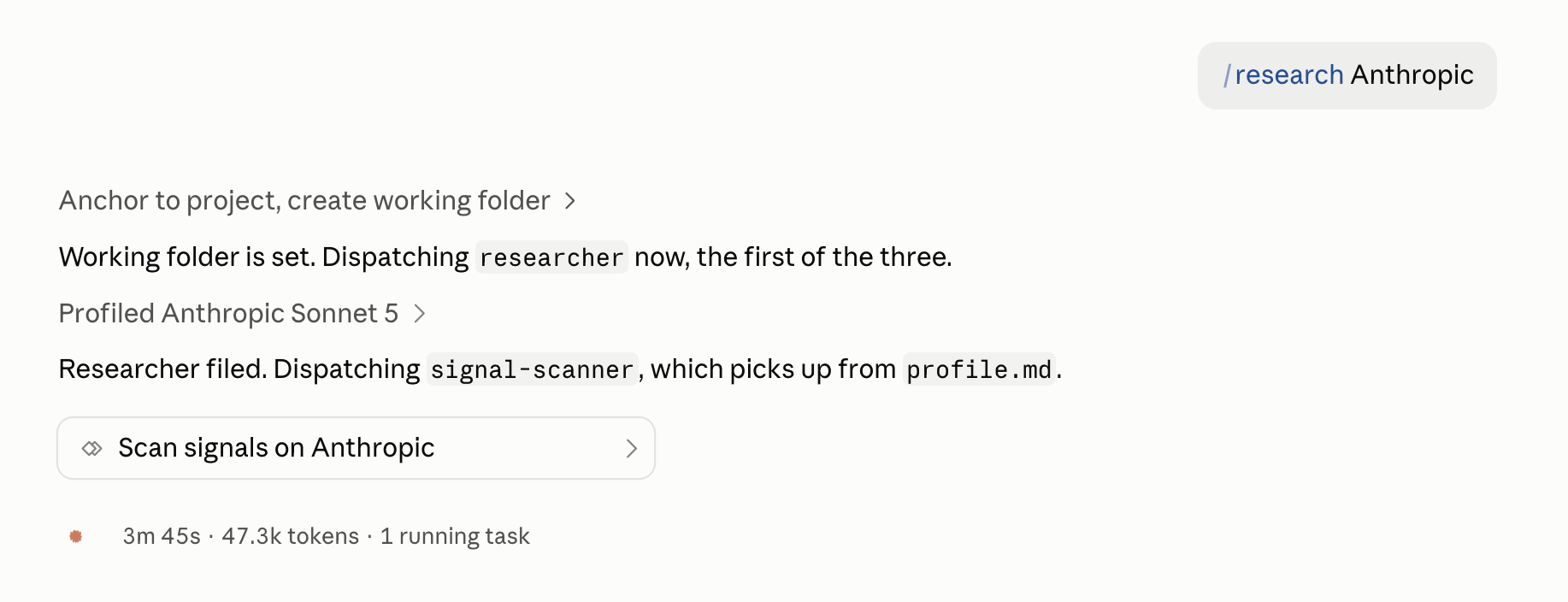
The team running in order: the researcher files first, then signal-scanner picks up what it left behind. The hand-off is the lesson. You’ll see: Three agents work in order: the researcher gathers information, the signal-scanner finds key signals, and the composer creates the final dossier. Wait while the three run; the dossier opens as a Claude Artifact and saves to
my-work/account-research/<company>/. - 3
Compare what each agent is allowed to use.
Open
.claude/agents/researcher.md,.claude/agents/signal-scanner.md, and.claude/agents/composer.md. Look at thetoolsline in each file.You’ll see: Each agent has only the tools it needs: researcher and signal-scanner carrying
WebSearch, WebFetch, because gathering is their job, and composer carryingRead, Write, Globand no web at all, because it works from what the other two already sourced. - 4
Find the handoff between agents.
Open
signal-scanner.mdand look at the first line of its job.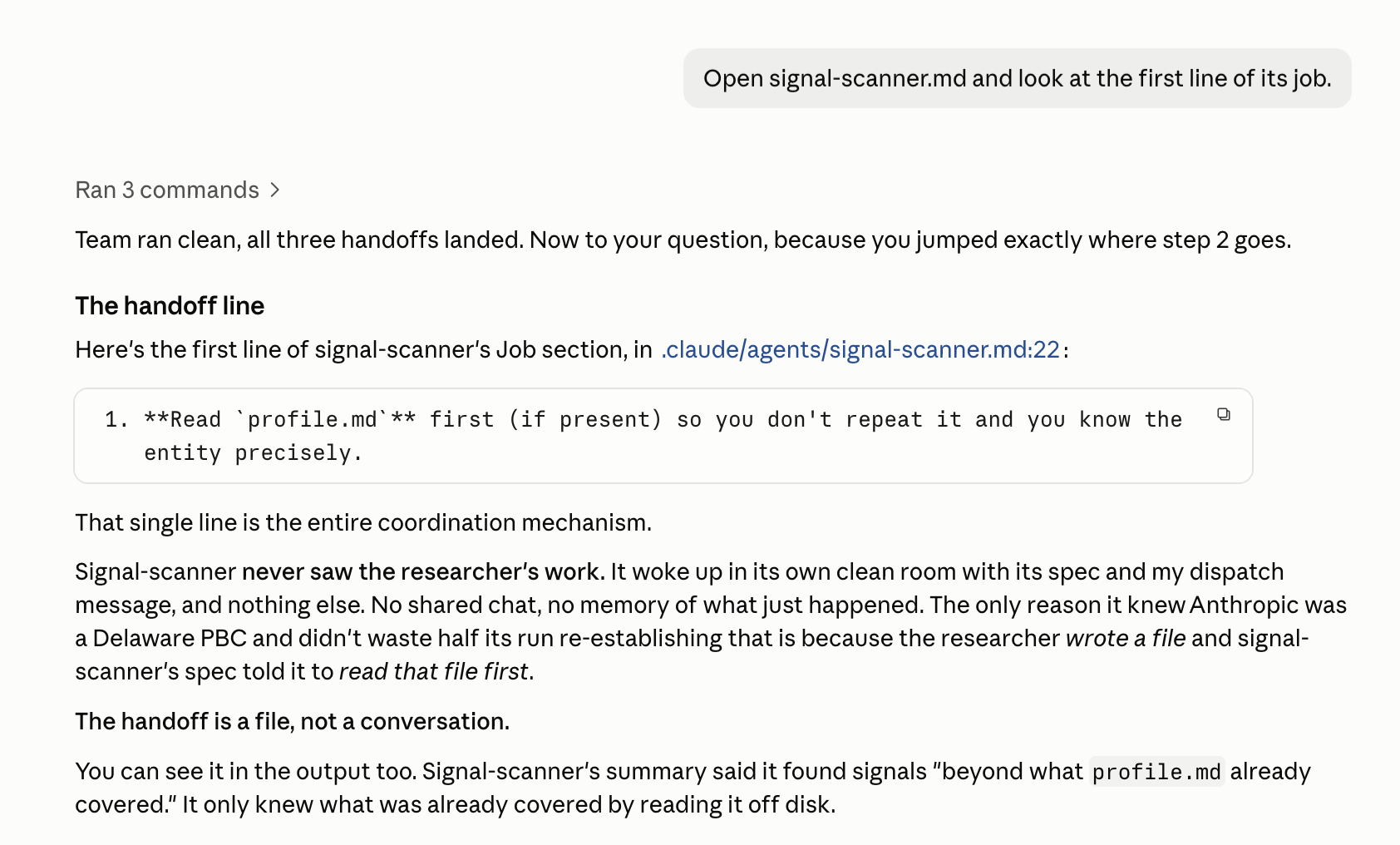
The handoff line, in the real seeded file: signal-scanner is told to read profile.md first. That one line is the whole coordination mechanism — the second agent never saw the first one work, only the file it left behind. You’ll see: The signal-scanner starts by reading the file created by the researcher.
- 5
Build your own agent team.
Name the roles your job needs, then create each one as an agent in
.claude/agents/You’ll see: Each agent gets a clear role, the tools it needs, and instructions for what it should read and create.
- 6
Run your team on real work.
Dispatch your agents together on the job you chose.
You’ll see: One agent completes its part and passes the work to the next.
- 7
Save a checkpoint.
Type
/bluerock:wrap-upYou’ll see: A summary of what you built and a saved checkpoint.
Recap
You just built and ran your first team of agents. You started with the Account Research team to see how agents work together, then created your own team and put it to work on a real job.
Each agent had a specific role, completed its part, and handed its work to the next.
You can break a bigger job into smaller parts and assign each one to a specialized agent.
The handoff is a file, not a conversation: signal-scanner never saw the researcher’s work, and your own second specialist picked up the same way. Add a role and the shape doesn’t change.
Practice
Put your agent team to work. Run it on real jobs a few times, improve it as you go, and notice which work you find yourself repeating.
- Run your team three times on real work.
- Improve one agent after each run and save the change.
- Notice a job you run at the same time every day or week. Write down when it should run and what should be true when it starts. In Session 7, you’ll put it on a schedule.
What’s next
Save your work
Your team runs when you ask. Before it runs on a clock, your project gets a backup: Session 7's routines work from your repo on GitHub.
Start: Save your workBuild with it
Each of these is an agent team like the one you just assembled.
- News Monitoring & ResponseTurn important industry news into a timely, informed response that reflects your company’s point of view.
- Battlecard RefreshKeep your competitive battlecards current — and see exactly what changed since the last time you looked.
- Brand Messaging DocWrite your positioning, voice, and proof points down once, in your own words, and see where your website drifts from them.
- Account ScorecardTurn a company name into a scored account brief based on the criteria that matter to your team.
- Competitor BattlecardsTurn competitor research into a sourced card per competitor your team can take into a deal.
- Account Signal DigestTurn account activity into a prioritized view of what changed and what deserves attention.
- Answer Engine VisibilitySee how AI answer engines describe your company, where you’re missing and what to improve.
- Sales Outreach PrepTurn a prospect list into a researched outreach kit: who they are, why now, and what to say.
You built a team of specialists.
Post the roles you chose. How other builders divided the same work will show you what yours is missing.
Learn more
Want to understand a little more about what just happened? Open these for a quick look behind the scenes.
Why does each agent work alone?
Each agent works in its own context, with its instructions, the files it needs, and the job you gave it.
- It reads only what it needs. The agent doesn’t inherit all the unrelated conversation from your chat. Less noise means more focused work.
- Your chat stays yours. An agent can read files and do its job without filling your conversation with every step. You get the finished result back.
- Specialists can multiply. Because each agent works independently, you can have several specialists working at once, each focused on its own part of the job.
This is also where subagent fits. When one agent sends another agent off to do a job in its own context, the second one is a subagent. It simply describes the relationship between the two.
What is an agent allowed to touch, and who decides?
Unlike a skill running in your chat, an agent works independently. That means its boundaries need to be clear.
The tools line defines what an agent is allowed to use. A researcher might need WebSearch and WebFetch. A composer working from existing research may only need Read and Write.
The principle is simple: give each agent only the tools it needs to do its job.
You make that decision when you define the agent, and you can change it as the role evolves.
model is optional. Smaller models can handle routine work well and cost less; more capable models can be useful when a role requires deeper synthesis.
Why does my own skill run without the /bluerock: prefix?
Skills you create live in your project at .claude/skills/ and belong to you. That’s why you can call one directly by name, like /research.
BlueRock’s built-in commands use the /bluerock: prefix, like /bluerock:check and /bluerock:wrap-up.
So the distinction is useful: your skills use their own names; BlueRock commands use the BlueRock prefix.
If you ever type a command you created and nothing happens, checking the name and prefix is a good place to start.
What does an agent know when it wakes up?
An agent starts with three layers of context, all coming from your project:
- The spec. Its standing role, instructions, tools, and way of working. This loads every time the agent starts.
- The dispatch message. The specific job you gave it this time.
- The project files. Whatever its instructions tell it to read, such as
profile.md,voice.md, or another agent’s output.
What’s missing is just as important: the agent does not automatically remember your entire conversation.
That’s why files matter. The researcher saves what it learns. The composer reads that work. Over time, those files can become durable project context that future agents can use too.
The AI and building terms these sessions use are collected in the glossary.