
The concepts behind the use cases, in the order they build.
Give your agent memory
Teach your project who you are, how you work, and what matters to you so you don’t have to explain it every time.
- Create three simple memory files that give your agents context about you.
- Your agents can start with your context instead of starting from scratch.
- A standing brief, a voice guide, and your current priorities saved in your project.
- About 20 minutes.
- Claude Desktop or Cursor connected to your project, with the BlueRock toolkit installed and
/bluerock:checkpassing.
How your project remembers you
Your project keeps important context about you in Markdown files: simple text files with names ending in .md. You worked with one in Session 3 when you changed your agent’s spec.
This time, you’ll use three files. Together, they give every agent you build the context it needs before it starts.
- 1CLAUDE.mdWho you are: your role, responsibilities, and important context.
- 2voice.mdHow you communicate: your style, preferences, and real phrasings.
- 3objectives.mdWhat matters now: your current goals and priorities, ranked.
These files live in your project. Your agents read them before they start working, so you don’t have to keep providing the same context. Next, you’ll fill in all three.
What you’ll do in Claude Code
We recommend doing the hands-on work in Claude Code, where you’ll be guided step by step. Prefer to follow along here? Use the instructions below. You’ll answer a few questions, share examples of your writing, and review the three memory files it creates for you.
- 1
Start the session.
Paste this into Claude Code:
teach me Session 4
You’ll see: Claude Code loads Session 4 and starts onboard, the skill that guides you through creating your memory files. (You can also type
/bluerock:learnto pick up wherever you left off.) - 2
Follow the prompts.
Answer onboard’s questions about you and your priorities. When asked, paste in two short examples of things you’ve actually written so it can learn how you communicate. If you already created a profile in ChatGPT or Claude, paste that in when prompted.
You’ll see: onboard builds
CLAUDE.md,voice.md, andobjectives.mdfrom your answers and shows you each one before saving it. - 3
Review and personalize.
Read each file before you approve it. Then follow the prompt to add one word you never use and one phrase that sounds like you.
You’ll see: those preferences added to
voice.md, making the guide more specific to you. - 4
Test it.
Follow Claude Code’s prompt to create a short test draft using your new voice guide.
You’ll see: a draft created without access to this conversation. Its only knowledge of your writing style comes from the memory file you just created.
- 5
Save a checkpoint.
When you’re finished, type
/bluerock:wrap-up. Review what Claude Code is about to save, then approve it.You’ll see: a checkpoint of your work, including the three memory files you created. The first time, it asks what name and email to record your saves under.
Recap
You taught your project who you are, how you communicate, and what matters most right now. Claude Code captured that context in three files and you tested that your voice carries into new work.
Your agents don’t have to start from scratch. Because your context lives in your project, they can begin with an understanding of who you are, how you communicate, and what you’re working toward.
Update the files as things change, and that context stays useful for the agents you build next.
Practice
Put your new project memory to work. Use it for three real pieces of writing this week, such as an email, status update, or short brief.
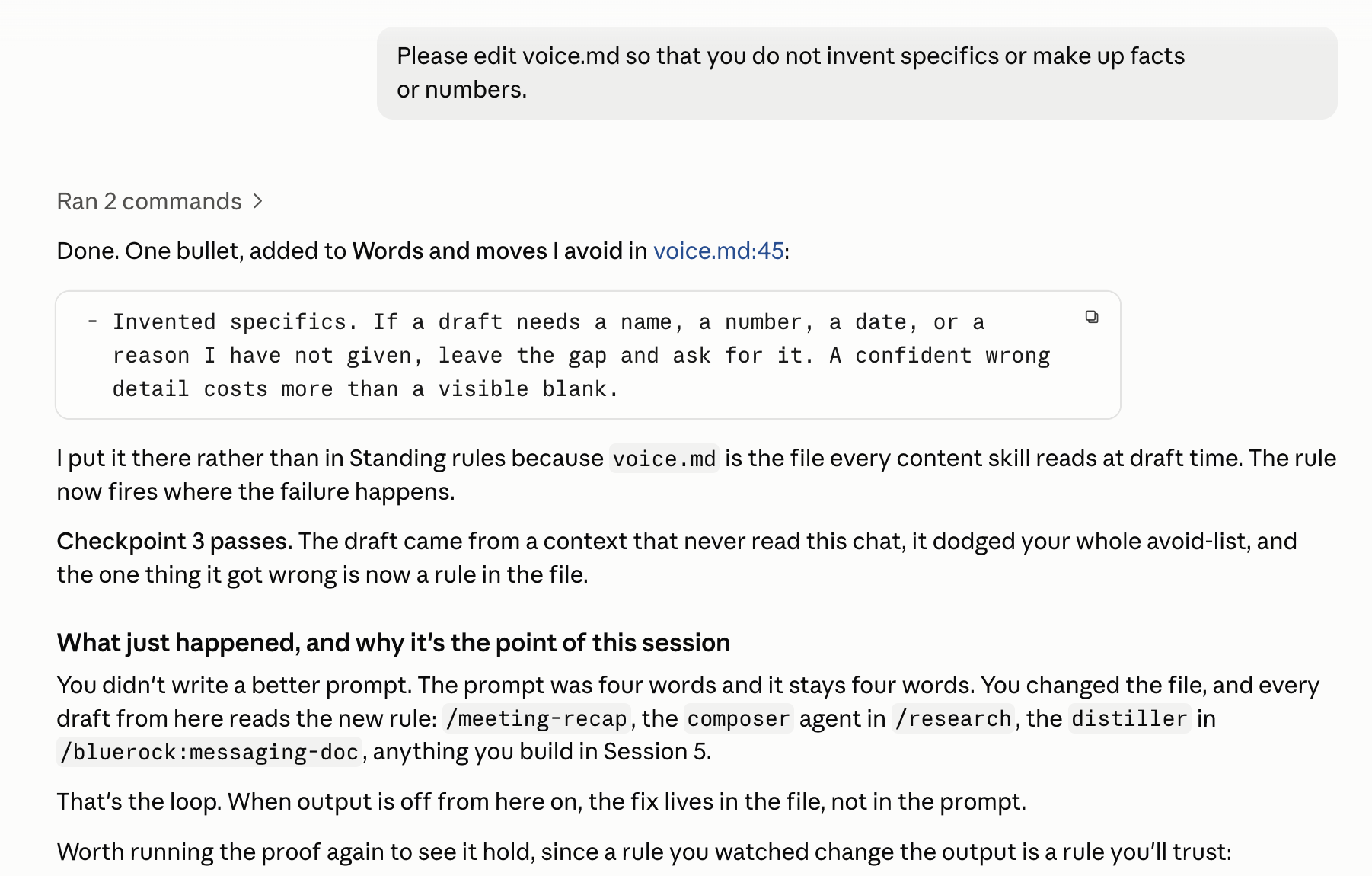
Each time, notice anything that doesn’t sound like you. Instead of fixing only the draft, update voice.md so your agents learn from the correction.
- Use your project for three real pieces of writing that someone else will read.
- Each time something sounds wrong, add a rule, phrase, or “avoid” to
voice.mdand save it. - Pick one task you do repeatedly that you’d like your agent to learn. Session 5 turns that repeatable task into a skill.
What’s next
Turn a task into a skill
Your project knows you now. Next, you'll take something you do the same way every week and write it down once, so you can run it by name.
Start Session 5Build with it
Every use case is a team, a skill, or a schedule like the ones this path teaches. Pick one and put it to work.
Pick a use caseSee how other builders write their voice file.
Your avoid-list does the most work. Post yours in Slack, and read theirs.
Learn more
Want to understand a little more about what just happened? Open these for a quick look behind the scenes.
Why is everything here a markdown file?
Markdown (.md) is a simple text format that both people and AI tools can easily read and edit. Unlike information buried inside an app or chat history, these files live directly in your project alongside the rest of your work.
That matters because the context becomes portable and persistent. It isn’t tied to one conversation. A new agent or session can read the same files and start with the context you’ve already captured.
Markdown is also intentionally simple. You can open the files yourself, see exactly what an agent knows about you, change a line, or remove something entirely. There’s no hidden database required to understand or maintain them.
What makes a voice guide actually work?
A useful voice guide is more than a list of adjectives like friendly, concise, or professional. Those descriptions leave a lot for an AI model to interpret.
Specific rules and real examples give the model stronger signals. For example:
Less useful:
Write in a professional but conversational tone.
More useful:
Use short paragraphs. Lead with the point.
Avoid "delighted" and "thrilled." Say "Here's
what I recommend" rather than "I'd be happy
to suggest."
Real writing samples make the guide stronger because they show patterns you may not think to describe: sentence length, vocabulary, structure, transitions, and how directly you make a point.
Your voice guide should evolve. When an agent produces something that doesn’t sound like you, identify why and add that rule or example to voice.md. Over time, corrections become reusable context instead of feedback you have to repeat.
What goes in objectives.md?
objectives.md tells your agents what matters right now.
Unlike CLAUDE.md, which contains relatively stable information about you, objectives are expected to change. They might include your current projects, goals, deadlines, or the order in which competing priorities should be handled.
Ranking matters. An agent can often complete a task in several reasonable ways. Knowing that one initiative is more important than another gives it additional context for deciding what to emphasize, recommend, or work on first.
Think of it this way:
CLAUDE.md = Who am I?
voice.md = How do I communicate?
objectives.md = What should matter most right now?
Review objectives.md whenever your priorities materially change.
Where does my personal information actually live?
The information you added in this session is stored in the three Markdown files inside your project: CLAUDE.md, voice.md, and objectives.md.
That is an important distinction. The agent isn’t expected to reconstruct this context from an old conversation every time you work with it. The project files provide a persistent source of context that agents can read when they start.
Because the files are visible, you can inspect exactly what you’ve saved, edit information that is outdated, or remove information you no longer want included.
This also means you should treat these files like other project data. Only put information in them that is appropriate for the agents and tools working with that project to access.
The AI and building terms these sessions use are collected in the glossary.