
News Monitoring & Response
Turn important industry news into a timely, informed response that reflects your company’s point of view.
Beginner · Marketing · Sales
A ready-to-use news response
A response to an industry story, grounded in verified information and shaped around your positioning.
First result in about 15 minutes · Saves ~1 hour per response (est.)
Marketing · Sales · No integrations required
You’ll need a link or the text of the story you want to respond to. Your company positioning and voice can come from context already in your BlueRock workspace.
Free for 30 days, then $10/month.
What happens after you sign up
You’ll need a paid Claude plan (the free plan does not include Claude Code) and Claude Desktop or Cursor on your computer.
Create your account
The console opens in a new tab. Confirm your email and your workspace is ready.
Connect your AI tool
Get started takes about 10 minutes, and this tab opens it when you sign up.
Build News Monitoring & Response
First result in about 15 minutes, from the command at the end of Get started.
Stuck at any step? Ask in the BlueRock Builders Slack, where builders and the BlueRock team answer.
The news moves fast. Your response should too.
A competitor makes an announcement. New regulation drops. Something changes in your market and there’s a window to respond.
But a useful reaction takes more than a quick AI-generated take. You need to understand what happened, check the important facts and connect the story to what matters to your company and audience.
BlueRock does that in one workflow — helping you move from breaking news to a credible, on-brand response while it still matters.
Your News Response
Get a response you can review, refine and use while the story is still relevant.
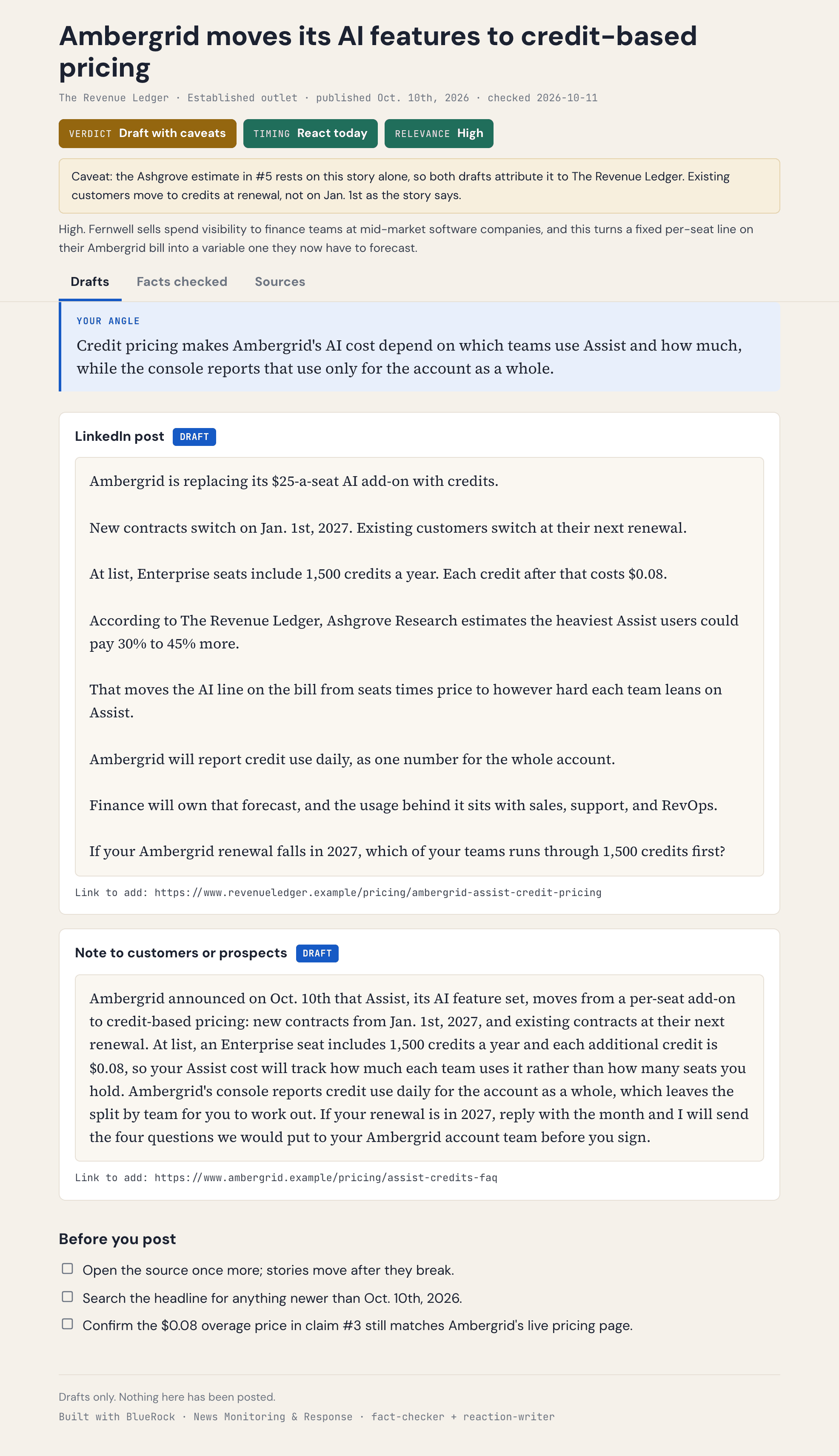
Your response shows:
- What happened — A concise summary of the story and the developments that matter.
- What’s verified — Important claims checked against additional sources before they’re used.
- What didn’t check out — Claims that couldn’t be confirmed, clearly identified instead of quietly included.
- Why it matters — The connection between the news, your market and your audience.
- Your point of view — A relevant angle grounded in your company’s positioning.
- A ready-to-use draft — A response written in your voice that you can review and publish where it makes sense.
You get the response and the evidence behind it, so you can move quickly without treating the first version of the story as fact.
How you’ll build it.
Start with the story you want to respond to. BlueRock handles the research, context and first draft.
Bring the story
Add a link or paste the news, announcement or development you want to respond to.
Check what happened
BlueRock identifies the important claims and checks them against additional sources, separating what can be verified from what can’t.
Find your angle
Connect the story to your company, audience and positioning to identify what’s worth saying — not just what happened.
Draft your response
Create a timely response in your voice, grounded in the verified facts and the point of view you want to bring to the conversation.
Bring the next story.
Your voice, positioning and company context stay in your BlueRock workspace. Bring in the next story and run it again — with the same context and checks already in place.
Respond faster and keep your point of view consistent without starting over.
Your project lives in your workspace. Back it up to GitHub once, and every build after this one is saved with it.
Why BlueRock?
- Your work and context stay with you
- BlueRock saves the instructions, inputs and decisions behind what you build — not just the final output.
- Build once. Keep improving.
- Run the workflow again, update it with new information and build on what you have already created.
- See and control the work
- Understand what your agents ran, what tools they used and what the work cost, with controls over what they can access and do.
- For this use case
- Bring in the next important story and turn it into a credible, on-brand response without starting from scratch.
Build your News Response.
Turn the next important story into a timely response grounded in verified information and your company’s point of view.
Already building? Run this in your workspace: /bluerock:news-reaction
You’ll need a paid Claude plan and Claude Desktop or Cursor. After you sign up, Get started connects your AI tool in about 10 minutes.
Free for 30 days, then $10/month.